Virtual poster sessions in GatherTown
General setup
Our two virtual poster sessions take place in Gather.town. We will update the link to the conference once we have finalized the preparation. General information about GatherTown can be found in this video.
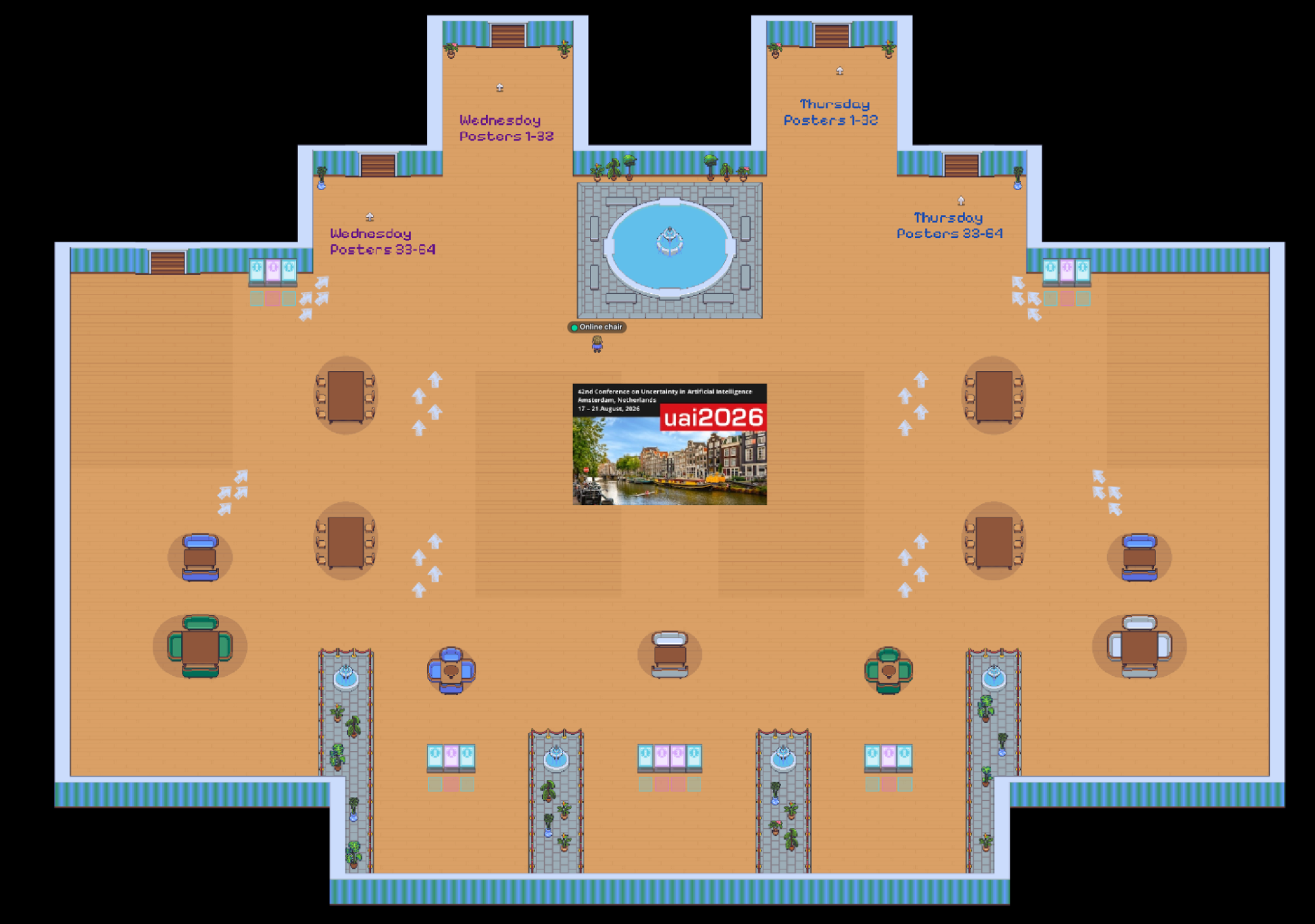
We have set up four rooms for the posters, each accessible from the Main room:
- Room 1: Wednesday Posters 1-26
- Room 2: Wednesday Posters 27-54
- Room 3: Thursday Posters 1-27 + 60
- Room 4: Thursday Posters 28-59
Here below is how the Lobby looks like, with the doors to each of these four poster rooms. Poster rooms will be open one hour before their scheduled session, and will remain open for one hour past their scheduled session.
Finding a poster
Each poster room contains 32 to 34 poster stands. We have tried to cluster the papers together by topics. Poster stands in the middle of the room correspond to oral presentations presented virtually.
Each poster stand has a number (poster id) that will be assigned to a specific paper. You can find the poster ids here, and in the next section. Each poster stand displays the poster id as well as the paper id, as follows: #poster_id PID paper_id.
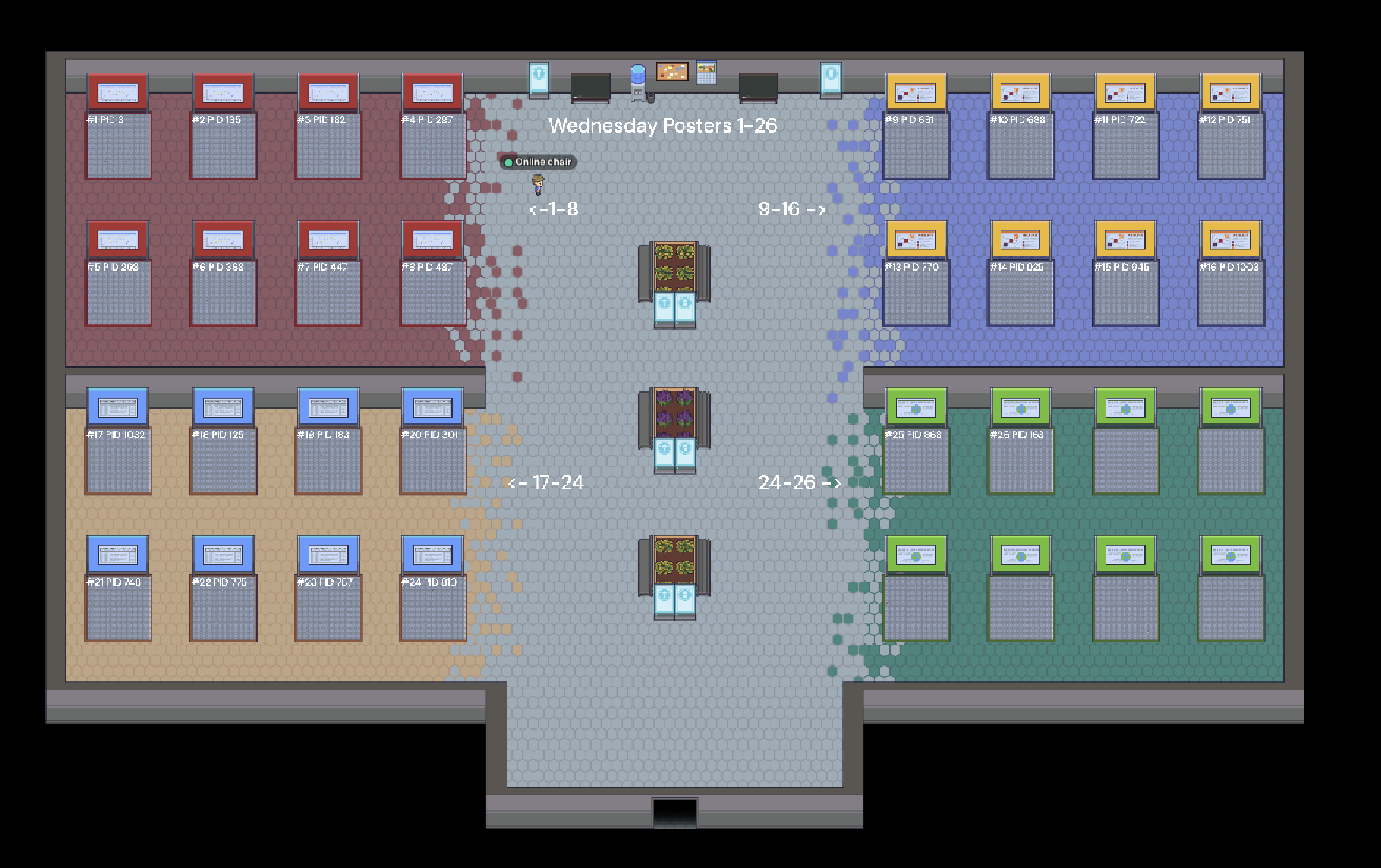
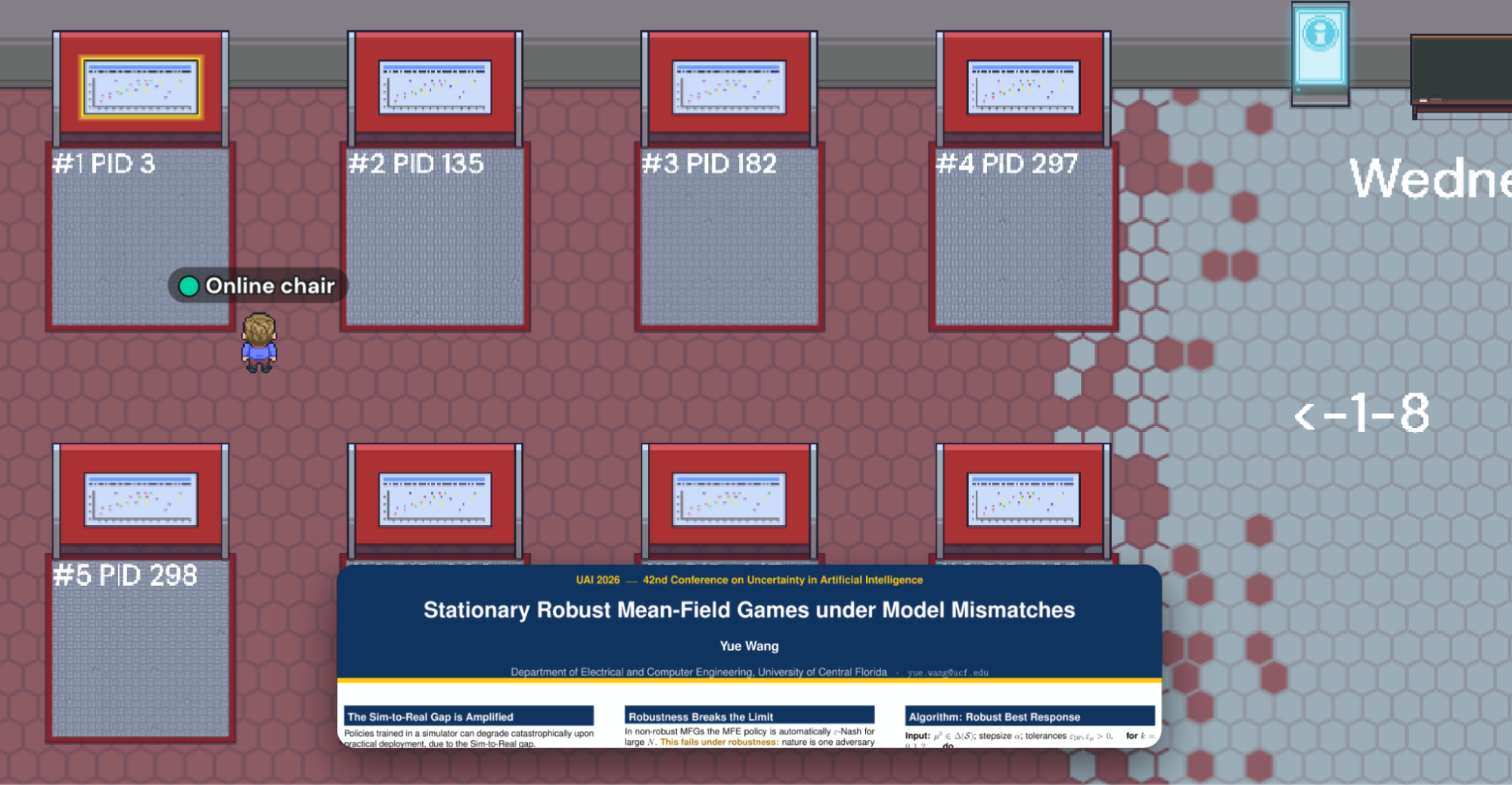
Example: The paper with paper id 3: “Stationary Robust Mean-Field Games under Model Mismatches” has been assigned poster id 1 of the Wednesday posters, so it can be found in the Room 1: Wednesday Posters 1-26 under the first poster stand with label #1 PID 3 in Room 1 below:
From the Lobby, walk into Room 1:

Go to papers 1-8:
Find the poster under #1 PID 3:
Poster Assignments
You can see the poster id assignments here.
Wednesday Posters
Paper ID / Paper title / Poster ID / Poster room
3 | Stationary Robust Mean-Field Games under Model Mismatches | 1 | Room 1: Wednesday Posters 1-26 |
135 | Policy-Based Trajectory Clustering in Offline Reinforcement Learning | 2 | |
182 | Bandit Learning for Online Scheduling with Immediate Decision | 3 | |
297 | CAIC: Congestion-Aware Intent Communication for Multi-Agent Reinforcement Learning | 4 | |
298 | Policy Optimization for Adversarial Linear Mixture MDPs with Unknown Transitions and Bandit Feedback | 5 | |
368 | HHC: Hierarchical Hypergraph Communication for Multi-Agent Systems | 6 | |
447 | Robust Transfer Learning With Side Information | 7 | |
487 | Multi-Agent RL with Invisible Collaborators: Marginal Advantage Estimation for Indirect Cooperation | 8 | |
681 | Robust Constrained Markov Games: Multi-Agent Decision-Making under Model Uncertainty and Constraints | 9 | |
688 | Gaussian Approximation and Multiplier Bootstrap for Federated Linear Stochastic Approximation | 10 | |
722 | Stochastic Dominance Driven First-Order Policy Optimization for Multi-Objective Reinforcement Learning | 11 | |
751 | SteinGate: Tail-Sensitive Safe Reinforcement Learning via Stein Discrepancy | 12 | |
770 | Provably Efficient Reinforcement Learning in Continuous-Time Episodic MDPs with Poisson Decision Epochs | 13 | |
925 | The Price of Knowledge: Optimal Algorithms for Costly Bandits | 14 | |
945 | Provably Efficient Personalized Multi-Objective Bandits with Proactive Conversational Queries | 15 | |
1003 | Revisiting TD Target Aggregation under Uncertainty in Q-Learning | 16 | |
1032 | Analytic Planning under Uncertainty with Moment Closure | 17 | |
125 | Federated Combinatorial Causal Bandits with Heterogeneous Causal Influences | 18 | |
183 | Instrumental and Proximal Causal Inference with Gaussian Processes | 19 | |
301 | On the Granularity of Causal Effect Identifiability | 20 | |
748 | Interpretable Causal Discovery via Causal-Effect Constraints | 21 | |
775 | Information-Theoretic Lower Bounds for Causal Inference under Credal Uncertainty | 22 | |
787 | Matched-Pair Experimental Design with Active Learning | 23 | |
810 | Structure Learning for Unfaithful Distributions: The Minimal Dependence Faithfulness | 24 | |
868 | Improving RCT-Based Treatment Effect Estimation Under Covariate Mismatch via Calibrated Alignment | 25 | |
163 | The Convergence Behavior of Adam under Heavy-Tailed Noise | 26 | |
90 | Conformal Prediction Sets for Instance Segmentation | 27 | Room 2: Wednesday Posters 27-56 |
264 | Identifying Labeling Mechanism in Positive–Unlabeled Learning under Unknown Class Prior | 28 | |
350 | Inference for quantile-parametrized families via CDF confidence bands | 29 | |
363 | Bandwidth Selection in Kernel Density Estimation for Model Calibration | 30 | |
389 | Metacognitive Arbitration as Uncertainty Compression in Multi-Agent Language Models | 31 | |
390 | Conditional neural control variates for variance reduction in Bayesian inverse problems | 32 | |
408 | Linear Regression with Heteroskedastic Errors | 33 | |
463 | Conformal Risk Sharing: Certified Cost Allocation with Participation Guarantees | 34 | |
482 | Fairness Uncertainty Quantification: A Constrained Stochastic Optimization Perspective | 35 | |
563 | Exact Uncertainty Propagation via Gaussian Process Neurons | 36 | |
584 | Improving online FDR procedures via online analogs of e-closure and compound e-values | 37 | |
617 | IDCR: Information-Directed Conformal Retrieval | 38 | |
650 | PCU: Perturbation-Calibrated Uncertainty for Unsupervised Anomaly Detection | 39 | |
738 | When Does Model Multiplicity Affect Prediction Intervals? A Sharp Phase Transition | 40 | |
808 | Valid and Efficient Uncertainty Quantification for Federated Joint Shift | 42 | |
931 | ALIGN: Adversarial Learning for Generalizable Speech Neuroprosthesis | 43 | |
990 | PRISM: Calibrated Bayesian Fusion and Auditable Attribution for Reliable LLM Event Prediction from Text | 44 | |
1039 | Score-Based Diffusion Priors for Adaptive Conformal Inference under Distribution Shift | 45 | |
1045 | Robustness Quantification for Discriminative Models: a New Robustness Metric and its Application to Dynamic Classifier Selection | 46 | |
1087 | Efficient Federated Conformal Prediction with Group-Conditional Guarantee | 47 | |
1128 | Calibration-Aware Online Adaptation under Label Shift | 48 | |
475 | Finite-Sample Regret Analysis of Nash Q-Learning with Random-Feature Approximation | 49 | |
867 | Tight rates of approximation of mixed Nash equilibria by entropy regularization in continuous games | 50 | |
994 | Expert Advice with Costly Observations | 51 | |
334 | Online Learning for Project Selection in Hedonic Project Games | 52 | |
228 | When Can We Learn from Noisy Logical Data? Parameterized Complexity of Approximate Concept Fitting in Description Logics | 53 | |
491 | Online Fair Allocation with Demand-Side Time-Dependent Weight | 54 | |
185 | Unified Confidence Adjustment for Robust Cross-Modal Retrieval under Test-Time Distribution Shifts | 55 | |
900 | Partial Causal Structure Learning for Valid Selective Conformal Inference under Interventions | 56 | |
Thursday Posters
Paper ID / Paper title / Poster ID / Poster room
Paper ID | Paper title | Poster ID | Poster room |
12 | Higher-Order Hit-&-Run Samplers for Linearly Constrained Densities | 1 | Room 3: Thursday Posters 1-27+60 |
17 | Implicit Variational Rejection Sampling | 2 | |
95 | Probabilistic Verification of Neural Networks via Efficient Probabilistic Hull Generation | 3 | |
144 | Exploiting Concavity Information in Contextual Bandit Optimization | 4 | |
204 | Kronecker-Structured Nonparametric Spatiotemporal Point Processes | 5 | |
245 | Particle Dynamics for Latent-Variable Energy-Based Models | 6 | |
354 | Poisson–Gamma Modeling of Inter-Relational Dependencies in Dynamic Knowledge Graphs | 7 | |
365 | From Bayes' Rule to Bayes Rules: Information Processing, Bayes' Theorem, and Imprecise Probabilities | 8 | |
451 | Implicit Learning for Reasoning in First-Order Probabilistic Logic | 9 | |
495 | Approximation Rates for Schrödinger Bridge Potentials via Fixed-Point ERM | 10 | |
821 | VaSST: Variational Inference for Symbolic Regression using Soft Symbolic Trees | 11 | |
829 | Learning to Infer Fast by Attending to Sparse Temporal Observations | 12 | |
885 | MMG: Mutual Information Estimation via the MMSE Gap in Diffusion | 13 | |
916 | Bayesian Experimental Design via Score Matching | 14 | |
947 | General Bayesian Policy Learning | 15 | |
1095 | Finding the Signal in the Spam: Jointly Learning Rewards and Worker Reliability from Pairwise Comparisons | 16 | |
150 | Gungnir: Exploiting Stylistic Features in Images for Backdoor Attacks on Diffusion Models | 17 | |
427 | EpiRDN: A Learnable Anisotropic Reaction-Diffusion Network for Epidemic Time Series Prediction | 18 | |
645 | Provable Subspace Identification of Nonlinear Multi-view CCA | 19 | |
710 | AudiFair: Privacy-Preserving Framework for Auditing Fairness | 20 | |
936 | Classical and Quantum Speedups for Non-Convex Optimization via Energy Conserving Descent | 21 | |
1077 | First-Order Softmax Weighted Switching Gradient Method for Distributed Stochastic Minimax Optimization with Stochastic Constraints | 22 | |
77 | Efficient Q-Learning and Actor–Critic Methods for Robust Average-Reward Reinforcement Learning. | 23 | |
239 | On the Sublinear Regret of Continuous K-Max Bandits | 24 | |
758 | Global Convergence of Average Reward Constrained MDPs with Neural Critic and General Policy Parameterization | 25 | |
920 | Explore, Refine, then Commit: Nearly Optimal Multi-Group Mean Estimation with Active Learning | 26 | |
1017 | When and How Often is Weighted Majority Vote Optimal Under Log Loss? | 27 | |
853 | Hyperbolic Belief Propagation | 60 | |
20 | Graph Contrastive Learning with Low-Rank Regularization and Low-Rank Attention for Noisy Node Classification | 28 | Room 4: Thursday Posters 28-59 |
62 | Score-Regularized Joint Sampling with Importance Weights for Flow Matching | 29 | |
187 | Remedying Coarsening-Based GNN Training under Heterophily via Adaptive Complementary Enhancement | 30 | |
275 | Grokked Models are Better Unlearners | 31 | |
278 | On the Effect of Sampling Diversity in Scaling LLM Inference | 32 | |
352 | Evaluating the Role of Great Pre-trained Diffusion Models in Few-shot Phase: Warm-up and Acceleration | 33 | |
361 | From Moves to Paths: A Hierarchical Framework for Trajectory Representation Learning | 34 | |
410 | A Sequence-Graph Fusion Framework via BiMamba and Fourier-KAN for Interpretable Drug-Target Affinity Prediction | 35 | |
456 | Not All Queries Need Deep Thought: CoFiCot for Adaptive Coarse-to-fine Stateful Refinement | 36 | |
497 | Gradient-Guided Reward Optimization for Inference-time Alignment | 37 | |
552 | ReVAD: From Imitation to Reasoning in Vectorized Autonomous Driving via Latent Space Search | 38 | |
660 | Controlling Path Dependence in Gradient Ascent Unlearning through Forget-Set Ordering | 39 | |
687 | Communication-Efficient Distributed Training for Collaborative Flat Optima Recovery in Deep Learning | 40 | |
724 | Learning Informative Attention Weights for Person Re-Identification | 41 | |
739 | ARGUS: Argumentation-Based Minimal-Change Repair for Verifiable LLM Self-Explanations | 42 | |
773 | Mitigating Spurious Correlations with Memorization-Guided Dataset De-Biasing | 43 | |
774 | Model Agnostic Graph Prompt Learning for Crystal Property Prediction | 44 | |
815 | From Global to Factor-Wise Expert Composition in Discrete Diffusion Models | 45 | |
819 | Capacity and Redundancy Trade-offs in Multi-Task Learning | 46 | |
845 | Adaptive Fourier Decomposition-guided Neural Operator Design for Inverse PDE Problems | 47 | |
1119 | Collapse-Aware Regularization for Reliable Reasoning Under Distribution Shift | 48 | |
1131 | EagleConv: Bio-inspired Dual-Foveated Convolution for Robust Small Object Detection | 49 | |
32 | SeSE: Black-Box Uncertainty Quantification for Large Language Models Based on Structural Information Theory | 50 | |
1038 | Transformer Based Bayesian Network Structure Learning from an Information Theory Perspective | 51 | |
490 | EVIA: Entropic Variational Inference Auto-encoding | 52 | |
458 | Neural Routed Boosting: Robust Learning against Heteroscedastic Noise | 53 | |
309 | Concept Sketching for Description Logics | 54 | |
492 | Group-Fair Allocations of Contiguous Blocks of Indivisible Items | 55 | |
1083 | LENS: Latent Precision Inference in Multi-LLM Routing | 56 |
Key Features of Gather
- Navigation: To reach a specific island in the virtual space, attendees can walk to the island.
- Private Areas: The shaded areas are called private areas. Anyone in these areas can see and hear each other's audio and video. However, those outside the private area cannot see or hear the videos of the people within it.
- Viewing Posters: When stopping at a poster, video chat activates only if one is within the designated area of the poster. Attendees can view the poster full-screen by pressing the "x" key on their keyboard.
- Presenter Mode: While viewing the full-screen image, attendees can select the Presenter Mode icon on the right of the image. This allows others who are also viewing the image in full-screen to see where you click on the screen.
Instructions for Presenters
The online chairs will upload all the virtual posters that you have submitted at the poster location assigned to each paper, so there is no need for the presenters to upload anything.
Test Session: All poster rooms will be open for presenters from 09.00 to 11.00 GMT+2 (Amsterdam time) on Wednesday, August 19 and Thursday, August 20. Please login to Gather.town, locate your poster, and check that your poster id is correct and everything is displayed correctly. If there is any problem with your poster, please contact the online chairs (uai2026chairs+online@gmail.com) immediately and let them know, as there are limited changes we can make at the last minute.
We also suggest that you login to Gather.town at least half an hour before your scheduled poster session to test that everything works.
Last updated: August 20, 2026 09:46 (UTC)
Sponsors: